
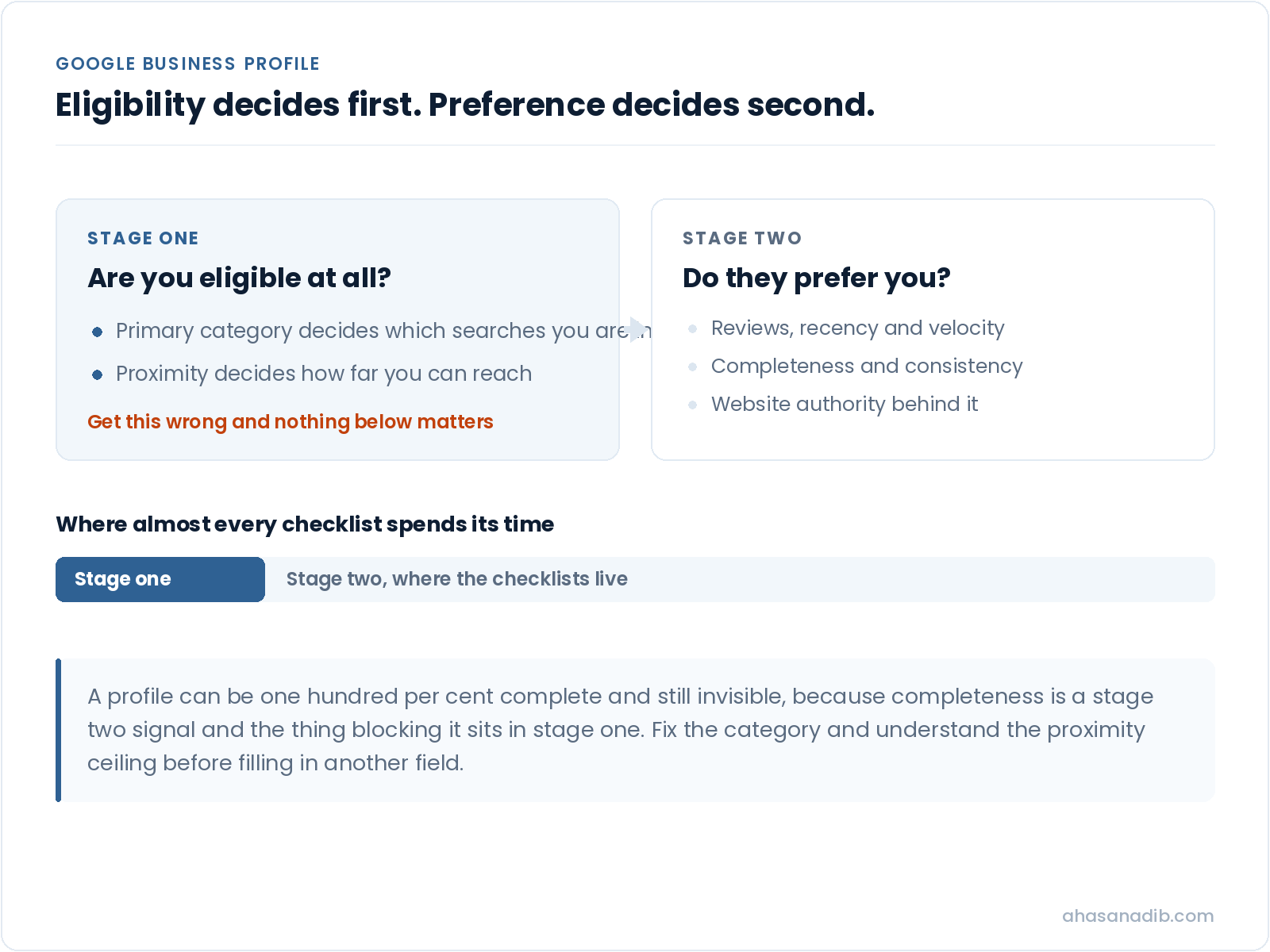
Google Business Profile optimization is the work of making your profile eligible for the searches your customers actually run, and then giving Google enough signal to prefer you over the three competitors it could show instead. Most of what gets sold under that name is form-filling, and form-filling is the smallest part of it.
I have spent five years doing this for local service businesses, and the pattern almost never changes. A business fills in every field, uploads photos, writes a description, and waits. Nothing happens. They conclude that local SEO does not work, when what actually happened is that they optimised the parts that were visible to them and left the two levers that decide the outcome untouched.
This piece covers both of those levers, the fields that genuinely move something, the ones that do not, and the specific ways this work gets a profile suspended. It is longer than it needs to be if you only want a checklist. Checklists are already the problem.
The short version
- 1Your primary category decides which searches you are eligible for at all. Get it wrong and nothing else you do matters.
- 2Proximity caps how far you can rank from your actual location. It is the most common reason a complete profile still does not show up.
- 3You cannot add keywords to a Google Business Profile. There is no keyword field, and putting them in your business name is the fastest route to a suspension.
- 4Reviews work on recency and velocity, not just total count. Forty reviews from three years ago is a weaker signal than twelve from this quarter.
- 5Most of what agencies bill for under posts and photos has a much smaller effect than category and proximity, which is why they rarely lead with those two.
What Google Business Profile optimization actually means
There are two separate jobs inside the phrase, and conflating them is why so much advice is useless.
The first is eligibility. Before Google can rank you for a search, it has to decide you are a plausible answer to it. That decision runs mostly on your primary category and your physical location relative to the searcher. If you are not eligible, your position is not low. You are not in the set at all.
The second is preference. Once you are eligible, Google chooses between you and everyone else who is also eligible. That is where reviews, completeness, engagement, your website’s own authority and the consistency of your business information across the web do their work.
Almost every guide to how to optimize Google Business Profile listings is a list of preference-stage tasks. That is fine if your eligibility is already right. If it is not, you can complete every task on every checklist and stay invisible, which is exactly what happens to most of the businesses that come to me convinced local search is a scam.
So the order matters. Fix eligibility first. Then compete.
Your primary category is the highest-leverage field on the profile
If you change one thing after reading this, make it this one.
Your primary category is not a label. It is the instruction that tells Google which searches you belong in. A business categorised as a general contractor and a business categorised as a bathroom remodeler are competing in two different sets of results, even if they do identical work and sit on the same street.
In Whitespark’s Local Search Ranking Factors research, which surveys practitioners on what actually moves local rankings, primary category has sat at or near the top of the map pack factors year after year. That has been consistently true for as long as the study has run, and it is still the single most commonly misconfigured field I find on audits.
Three things go wrong with it.
Businesses pick the category that describes what they are rather than what people search for. A firm that thinks of itself as a wellness studio may need to be categorised as a gym, because that is the category attached to the searches its customers run. Your self-image is not a ranking factor.
Businesses pick a category that is too broad. Broad categories put you in a larger pool with stronger competitors. A narrower, accurate category often produces more visibility, not less, because the eligible set is smaller and you rank inside it rather than at the bottom of a huge one.
Businesses add secondary categories carelessly. Secondary categories widen the range of searches you can appear in, which sounds free and is not. Adding categories you do not genuinely serve dilutes the relevance signal on the ones you do, and it invites the kind of profile edit that draws scrutiny.
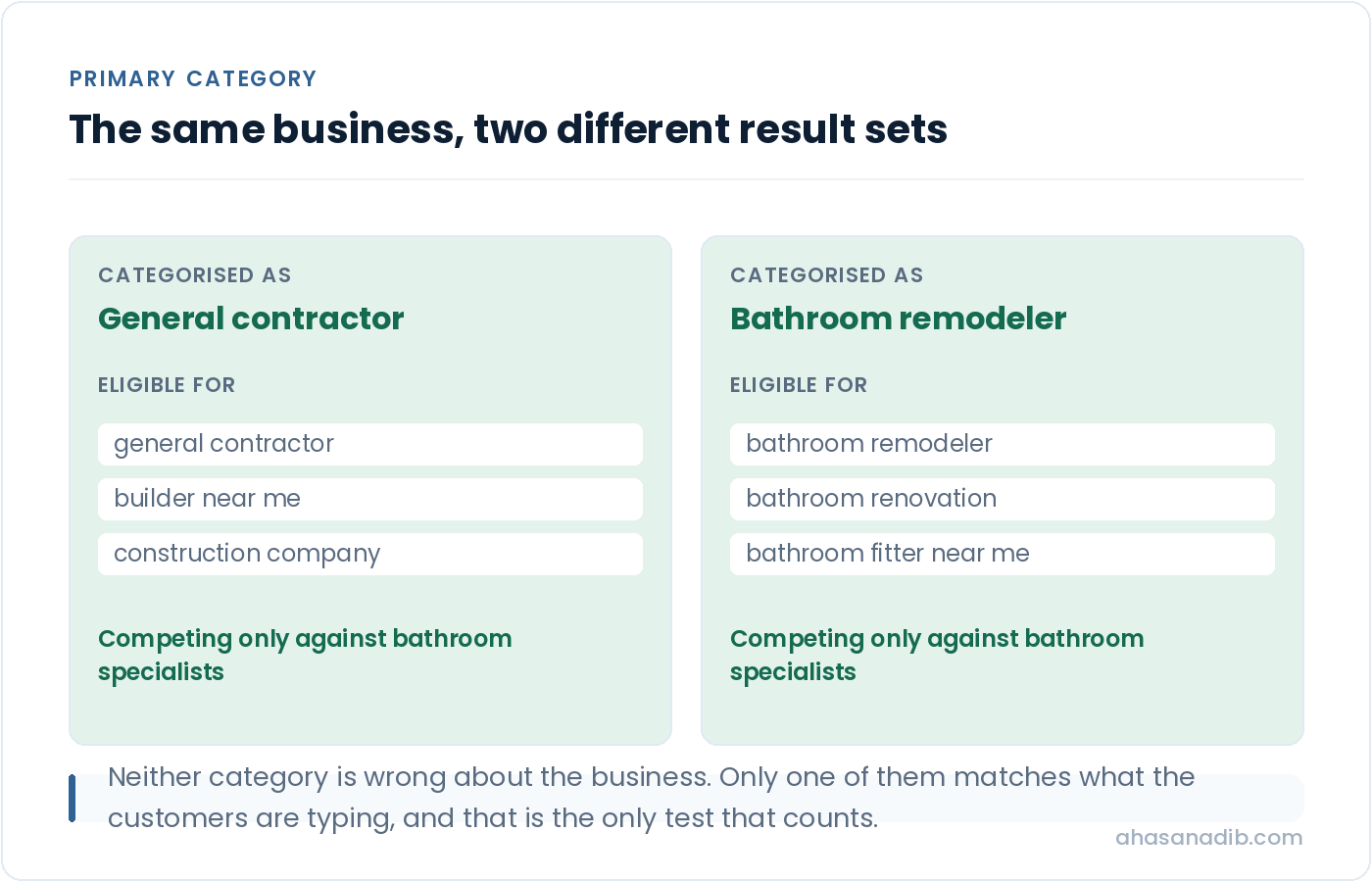
The practical method is to work backwards. Find three or four competitors who rank where you want to rank for the searches you care about, look at the primary category each of them uses, and compare that to yours. If they are all in one category and you are in another, you have your answer, and the fix takes ninety seconds. I have seen that single change move a business into the map pack within a fortnight, with nothing else touched.
The proximity ceiling, and why a complete profile still does not rank
The constraint nobody selling optimisation wants to lead with.
Local results are personalised by where the searcher is standing. Not by their city. By their actual position, sometimes to within a few streets.
This has a consequence most guides skip. There is a radius around your business inside which you can realistically compete, and outside it you cannot, no matter how well optimised your profile is. A plumber in one part of a city will not appear in the map pack for a searcher across town, because three equally good plumbers sit closer to that person. That is not a failure of optimisation. It is the system working as designed.
Two things follow from this, and both matter more than any checklist item.
The first is that you should be checking your rankings from locations, not from your desk. Searching your own term from your own office tells you almost nothing, because you are standing on top of your own business. The honest version of a local rank check is a grid: your position for the same term sampled at points across your service area, which shows the shape of your visibility rather than a single flattering number.
The second is that proximity explains most cases of why is my business not showing up on Google. Before assuming something is broken, work out whether you were ever eligible at that distance. I have had clients convinced they had been penalised when the truth was that they were checking from a suburb eight miles outside the area they realistically serve.
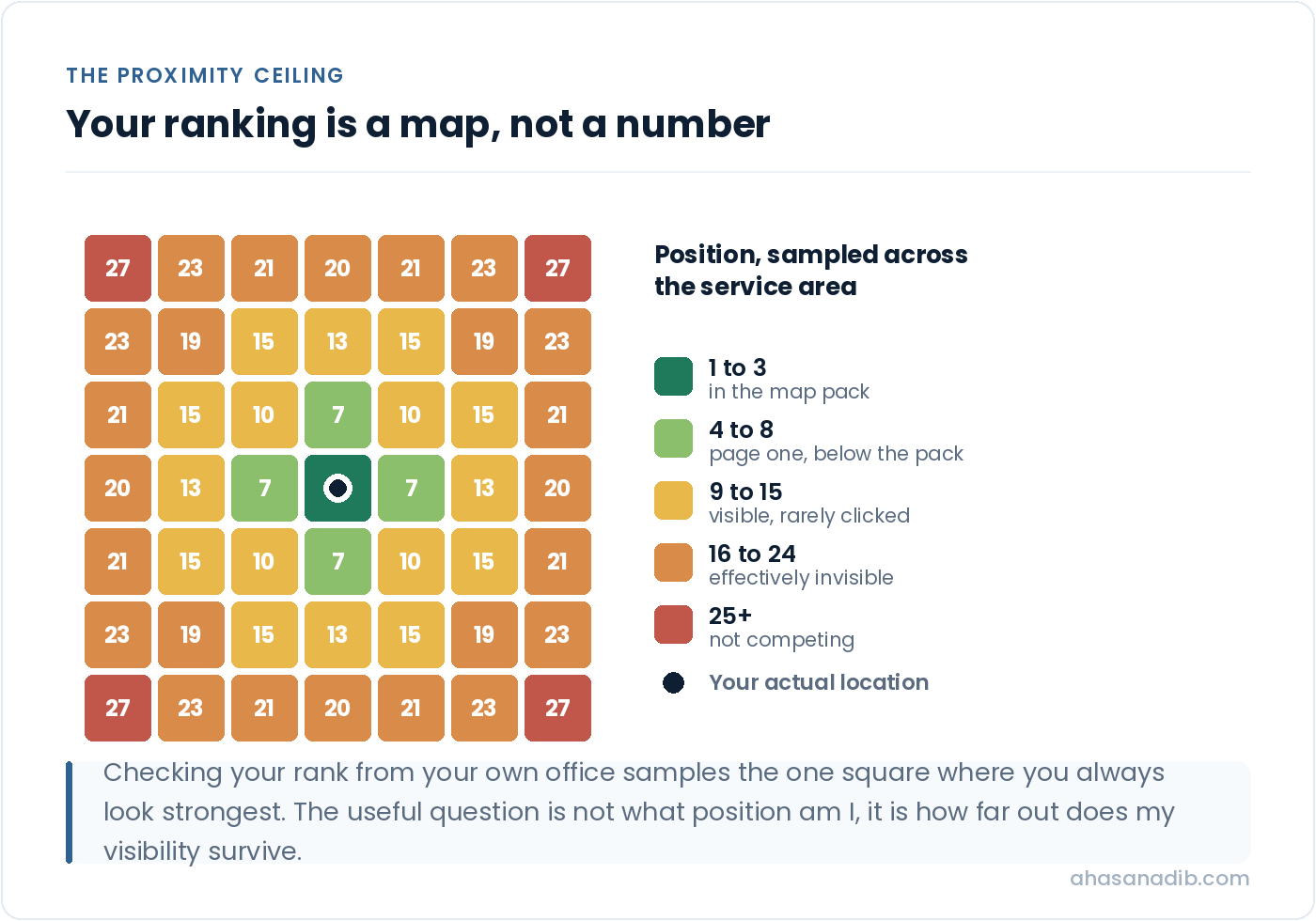
What proximity does not mean is that the radius is fixed. Prominence stretches it. A business with substantially stronger reviews, a stronger website and better-established information can pull visibility further out than a weaker competitor sitting closer. That is the actual game: you are not beating distance, you are earning enough prominence to overcome some of it.
You cannot add keywords to a Google Business Profile
Three separate versions of this question get searched every month, and the answer to all of them is the same.
There is no keyword field. There is no hidden setting. The questions people search, how do I add keywords to my Google Business page and how to add keywords to Google My Business among them, are all reaching for something that does not exist, and the advice that fills the gap is frequently dangerous.
What actually happens is this. Google reads relevance from your categories, your services, your website, your reviews and the text on your profile. Those are the inputs. There is no separate keyword layer sitting on top of them.
The specific bad advice worth naming is keyword-stuffing the business name. Changing “Harper Plumbing” to “Harper Plumbing | Emergency Plumber | Boiler Repair” does sometimes produce a short-term ranking bump, which is why the practice survives. It is also a direct violation of Google’s guidelines for representing your business, which require the name to be the real-world name of the business. The penalties range from a silent edit that reverts your name to a hard suspension that removes the profile from search entirely while you appeal.
I have picked up clients recovering from exactly that. The reinstatement process is slow, it is unpredictable, and while it runs you have no local visibility at all. Weighing a few weeks of inflated ranking against that is a bad trade that nobody explains before selling the tactic.
What to do instead. Use the services section properly, because it accepts a genuine list of what you do and the descriptions attached to each. Write a business description that reads like a person wrote it and happens to contain the terms your customers use. Make sure your website actually covers the services you want to be found for, since Google reads it as part of the picture. None of that is keyword insertion. All of it is relevance, which is the thing keyword insertion is a crude imitation of.
Verification, and the ways it quietly goes wrong
Google Business Profile verification is the step that makes everything else count, and an unverified profile is a profile that mostly does not compete. Verification is also where a surprising number of businesses are stuck without knowing it.
The common failures are worth listing plainly, because each has a different fix. A profile verified years ago by a former employee or a previous agency, with nobody at the business holding access. A profile that was verified and then lost verification after an address or name edit triggered a re-check. A duplicate profile competing with the real one, usually created accidentally, splitting reviews and signals across two entries. And a business operating from a location that does not meet the requirements for a physical listing, most often a virtual office or a coworking desk, where the honest answer is that a service-area business is the correct configuration rather than a workaround.
If you are not certain who controls your profile, resolve that before anything else. Optimisation work on a profile you cannot edit is optimisation you will have to do twice.
The fields that move something, and the ones that do not
Completeness matters, but not every field carries the same weight.
Google says a complete profile performs better, and that is true as far as it goes. It is not true that every field contributes equally, and treating them as a flat checklist is how time gets spent in the wrong places.
The fields worth real attention are the ones that feed eligibility and trust. Your categories, covered above. Your name, address and phone number, which need to match what appears everywhere else about you, because inconsistency across the web is a genuine drag on local performance. Your hours, including holiday hours, which affect whether you appear in searches filtered by open now. Your services, with descriptions, which is the closest thing to a relevance field the profile has. And your website link, since your site’s own authority is part of what Google weighs.
The fields that matter less than the effort spent on them are attributes beyond the obviously relevant ones, the opening date, and the endless small toggles. Fill them in, because completeness has some value and it costs ten minutes. Do not mistake filling them in for having done the work.
The description is worth a specific note, because it is routinely misused. It does not carry much direct ranking weight. It does carry conversion weight, because a person choosing between three profiles reads it. Write it for the human deciding whether to call you, not for the algorithm deciding whether to show you.
Reviews: recency and velocity, not just the total
Most advice about reviews stops at get more of them. The mechanics are more specific than that, and the specifics change what you should actually do.
Recency carries weight. A profile with forty reviews, the newest of which is two years old, sends a weaker signal than one with twelve where three arrived this month. A review count is a lifetime number; what a search engine is trying to work out is whether you are currently a going concern that people currently choose.
Velocity matters, and so does its shape. A steady trickle looks like a business serving customers. Twenty reviews in one week after eighteen months of silence looks like a campaign, and it is the pattern most likely to get reviews filtered out. If you are starting a review programme after a long gap, pace it deliberately rather than asking your entire customer list on the same afternoon.
Review content is read, not just counted. Reviews that mention the specific service and the area are more useful to you than reviews that say great service, because the text is part of how relevance is established. You cannot script this without crossing into fake reviews, which is both against the guidelines and obvious. What you can do is ask in a way that prompts specificity: asking somebody what they had done rather than whether they were happy tends to produce a more useful review honestly.
Responding is the cheapest thing on this list and the most skipped. Respond to all of them, including the bad ones, and particularly the bad ones, because the response is read by every future customer who scrolls past it. A calm, specific reply to a one-star review converts better than the review costs you.
Updates and photos: what they do and what they do not
This is where a lot of retainers get spent, so it deserves an honest assessment rather than an enthusiastic one.
Google Business Profile updates, the posts that appear on your profile, have a genuine but modest effect. They can improve engagement, they occupy space on your profile, and they give returning searchers something current to see. What they do not reliably do is move rankings on their own. If somebody is charging a meaningful monthly fee primarily to publish weekly updates, ask what else is included, because that alone is not a local SEO programme.
Photos are similar but slightly stronger. Profiles with real, current photographs perform better on engagement, and engagement is part of the picture. The distinction that matters is real versus stock: photographs of your actual premises, team and work carry weight that a stock image of a generic storefront does not, and customers can tell the difference immediately.
Both are worth doing. Neither is worth doing instead of fixing your category.
How optimisation gets a profile suspended
The risk nobody mentions while selling the tactic.
Suspension is not rare and it is not always deserved. Sometimes a legitimate edit triggers a review. But the avoidable causes are consistent, and every one of them appears in advice published as optimisation.
Keyword stuffing the business name, covered above, is the most common. Using an address you do not operate from, including a virtual office or a mailbox, is the second. Adding categories that do not describe what you do. Creating a second profile for the same location to target another area. Listing a service-area business with a street address it does not staff. Making several significant edits in quick succession, which on its own can flag a profile for review even when each edit is legitimate.
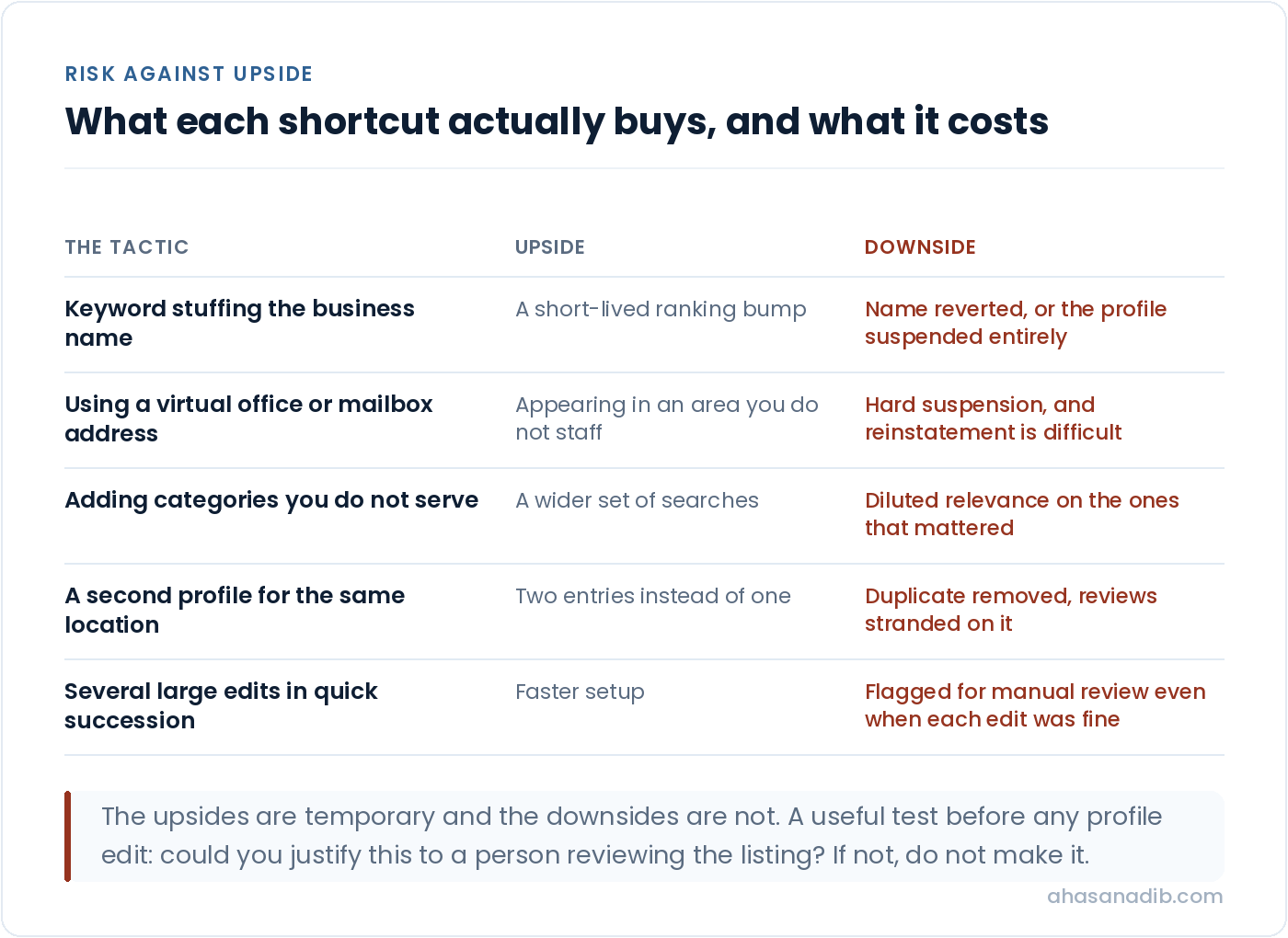
The cost is asymmetric and that is the point. The upside of an aggressive tactic is a temporary ranking improvement. The downside is losing local visibility entirely for an unpredictable period while an appeal runs, with no guarantee at the end of it. For a business where the phone ringing depends on the map pack, that is not a risk worth a short-term position.
My rule with clients is simple. If a change would be hard to justify to a person reviewing the profile, do not make it. That single test removes almost every suspension risk without costing anything real.
How to tell whether any of it worked
Optimisation without measurement is decoration, and the default reporting on this is easy to misread.
The performance data inside your profile separates how people found you, and that split is the most useful number on it. Direct searches are people who searched your business name; they already knew about you. Discovery searches are people who searched a category or service and found you; those are new customers. A rise in total views driven entirely by direct searches usually means your other marketing worked, not your local SEO. A rise in discovery searches is the number that tells you this work is doing something.
Alongside that, watch the actions rather than the impressions. Calls, direction requests, website clicks and messages are the things that turn into revenue. Impressions can climb while calls stay flat, and when that happens the problem has usually moved from visibility to conversion, which is a different fix.
Track your position on a grid across your service area rather than a single number, for the proximity reasons above. And give it time on a realistic horizon: category changes can show within a fortnight, review and prominence work takes months.
The results I am most confident about came from doing exactly this over time rather than from any single tactic. A cleaning business I worked with grew organic traffic 540% with a 605.7% rise in new users inside three months, and a fitness business grew 532% on a focused local strategy. Both are written up with the detail on my results page, and neither came from posting weekly updates.
Why your business is not showing up on Google
Working through this in order resolves most cases without any optimisation at all.
Check that the profile is verified and that you control it. Check that you are not looking at a duplicate. Check your primary category against the competitors who do rank. Check the distance between where you are searching from and where your business actually is, because that alone explains a large share of cases. Check whether you have been suspended, which shows in the profile rather than being announced. Check that your hours do not exclude you from the searches you care about. And check that your name, address and phone number agree across your website, your profile and the major directories.
If all of those are clean and you still do not appear, the answer is usually prominence rather than a fault: the competitors ranking above you are simply better established, and closing that gap is a programme rather than a fix.
Google Business Profile FAQs
How do I fully optimize my Google Business Profile?
Start with eligibility rather than completeness. Set the primary category to match what ranking competitors use, verify the profile and confirm you control it, then complete name, address, phone, hours and services accurately. After that, work on prominence: a steady flow of recent reviews, real photographs, consistent business information across the web, and a website strong enough to support the profile. Filling in every field without fixing the category first is the most common wasted effort.
Can I add keywords to my Google Business Profile?
No. There is no keyword field. Relevance comes from your categories, your services and their descriptions, your website and your reviews. Adding keywords to your business name breaks Google’s representation guidelines and risks a suspension that removes your profile from search while you appeal.
Why is my business not showing up on Google?
Most often proximity: local results are personalised to the searcher’s position, so you may simply be too far from where you are testing. After that, check verification, duplicate profiles, an incorrect primary category, a suspension, and hours that exclude you from open-now searches. Genuine penalties are far rarer than any of these.
How much does Google Business Profile optimization cost?
The profile itself is free and the initial setup is a few hours of work you can do yourself. Ongoing management is usually sold as a monthly retainer, and what varies is whether it includes the work that matters or only posts and photos. Ask specifically what happens in month two, because a one-off optimisation is a legitimate project and a recurring fee for weekly updates usually is not.
How long does Google Business Profile optimization take to work?
Category and eligibility fixes can show inside two weeks because they change which searches you qualify for. Prominence work, meaning reviews, citations and website authority, is a matter of months. Anyone promising map pack positions in days is describing either a very uncompetitive area or something that will not last.
Do Google Business Profile posts help rankings?
Modestly, and less than most agencies imply. Updates improve engagement and give returning searchers something current, but they do not reliably move position on their own. They are worth doing and they are not worth doing instead of fixing your category or building reviews.
Can I rank outside my city?
Only within limits. Proximity caps how far your profile can realistically appear, and no amount of profile work removes that ceiling. Stronger prominence stretches the radius, so businesses with better reviews, stronger websites and more consistent information do appear further out than weaker competitors nearby. But a business in one part of a city will not dominate the whole of it through profile optimisation alone.
Where I would start
If you do three things from all of this, do these.
Check your primary category against three competitors who rank where you want to be. It takes ten minutes and it is the change most likely to produce a visible result.
Check your visibility from across your service area rather than from your desk, so you know whether you have a ranking problem or a proximity expectation problem. Those need completely different responses and they look identical from the office.
Start a review habit you can sustain, at a pace that looks like a business rather than a campaign. It compounds, competitors find it hard to copy quickly, and it is the part of this that keeps working after the setup is done.
Everything else on this page matters, and none of it matters as much as those three. If you want the rest handled properly alongside the site work that supports it, that is what my local SEO service covers, and a technical audit is usually where I start when the website is holding the profile back.
Not sure whether it is your profile or your proximity?
Bring your business to a free call. I will check your category against the competitors ranking above you and show you what your visibility looks like across your actual service area, which is usually where the answer is.
Book a free call →