
What makes Shopify SEO different from SEO
Most Shopify SEO tips are general SEO advice with the word Shopify added to the title. They tell you to write good titles and get links, which is true of every website ever made and helps nobody running a store.
The tips that actually matter on Shopify are the ones that exist because of decisions the platform made on your behalf. Shopify forces every product under a /products/ path and every category under /collections/. It creates a second copy of each product inside every collection that product belongs to. It builds a collection containing your entire catalogue whether you asked for one or not. It generates your sitemap automatically. None of that is a bug, and none of it is something you chose.
So the useful question is not what SEO you should do. It is which of Shopify’s defaults are quietly costing you, and in what order to deal with them. That is what the twelve tips below are.
The order to work in
Order matters more than the list. Rewriting product descriptions on pages that search engines are treating as duplicates is effort you will not get back. Work outward from the structural problems.
Each phase makes the next one worth more. Skipping to phase three is the most common and most expensive mistake on a Shopify store.
Stop the duplication
- Collection-scoped URLs
- Tag and filter pages
- The all-products collection
Collection pages
- Real content
- Written titles
- Handles buyers search
Product pages
- Your own copy
- Titles that match search
- Out-of-stock handling
Speed and markup
- App weight
- The hero image
- One Product schema
Phase 1: Stop the platform working against you
1. Fix products linked through collection paths
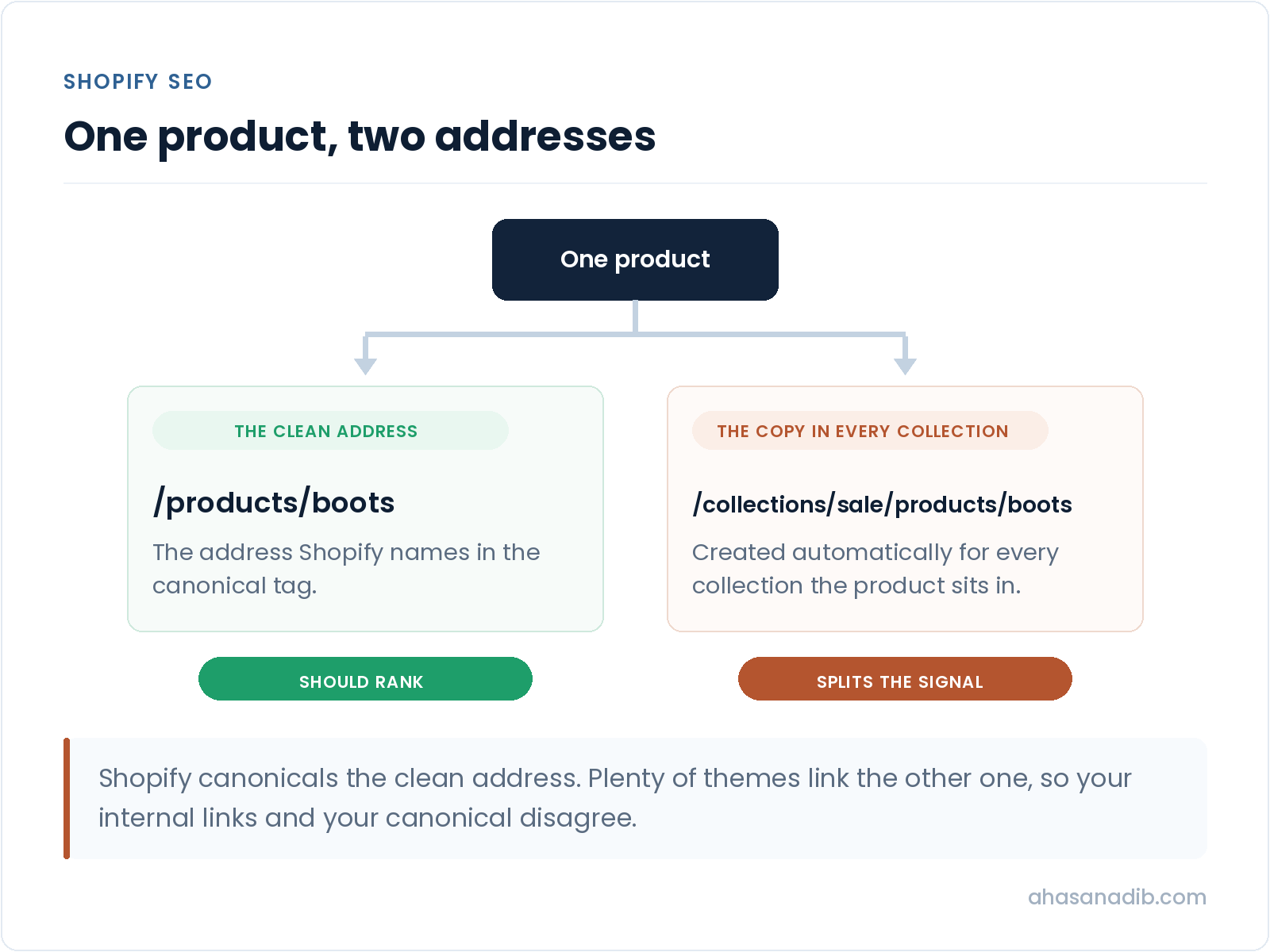
Every product on your store is reachable at two addresses. There is the clean one, /products/handle, and there is a copy inside each collection the product sits in, /collections/whatever/products/handle. Shopify sets the canonical to the clean version by default, which is the right call.
The problem is what your theme does. Plenty of themes link products through the collection path, because that is how the customer arrived. So your internal links point at one address while your canonical tags nominate another, and the two disagree about which page matters. You have not broken anything, but you have split the signal on every product you sell.
Check by opening a collection and hovering a product. If the URL contains /collections/, your theme is doing this. The fix is in the theme, usually one line where the product URL is built.
2. Bring tag and filter URLs under control
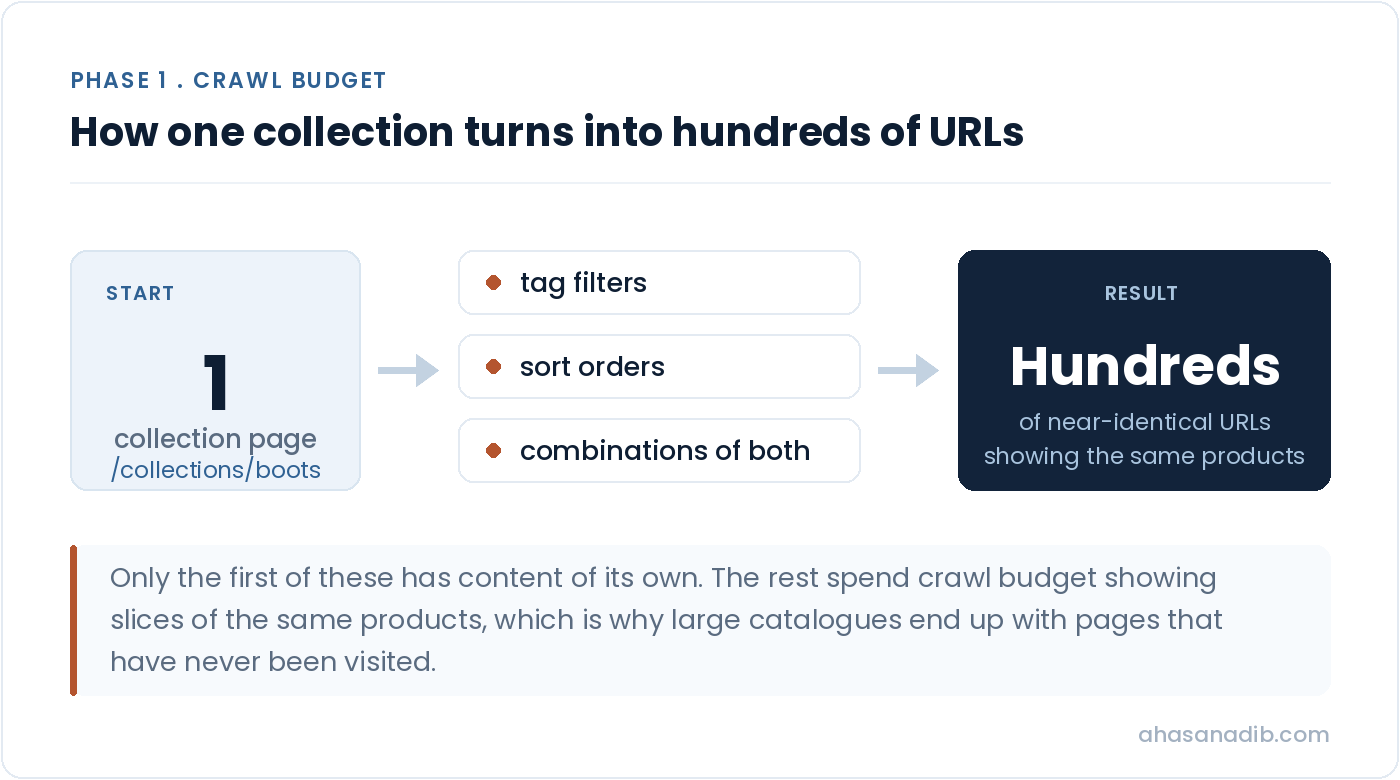
Tag filtering is where large catalogues quietly break. A collection with eight tags can generate hundreds of near-identical pages, each showing a slice of the same products with no content of its own. Add sort orders and filter combinations and the number climbs fast.
Search engines will happily crawl all of it. That is where your crawl budget goes, and it is why stores with two thousand products find that a third of them have never been visited. Decide which filtered views deserve to exist as pages, and block or noindex the rest.
3. Deal with the all-products collection
Shopify creates /collections/all on every store automatically. It contains everything you sell, which makes it a complete duplicate of your catalogue at a second address. Most store owners have never opened it.
It has legitimate uses, and it is not automatically a disaster. But it should be a deliberate decision rather than something running in the background. Check whether it is indexed and decide on purpose.
Until the duplication is settled, everything you do to a product page is being divided between two versions of it.
- /products/handle
- Named by the canonical
- The page you want ranking
- /collections/x/products/handle
- Created automatically
- Where many themes point
- Make internal links agree
- Usually one theme change
- Applies to the whole catalogue
This is the single highest-reach fix on most stores, because it applies to every product at once rather than one page at a time.
Phase 2: Make collection pages earn their place
4. Give every collection you care about real content
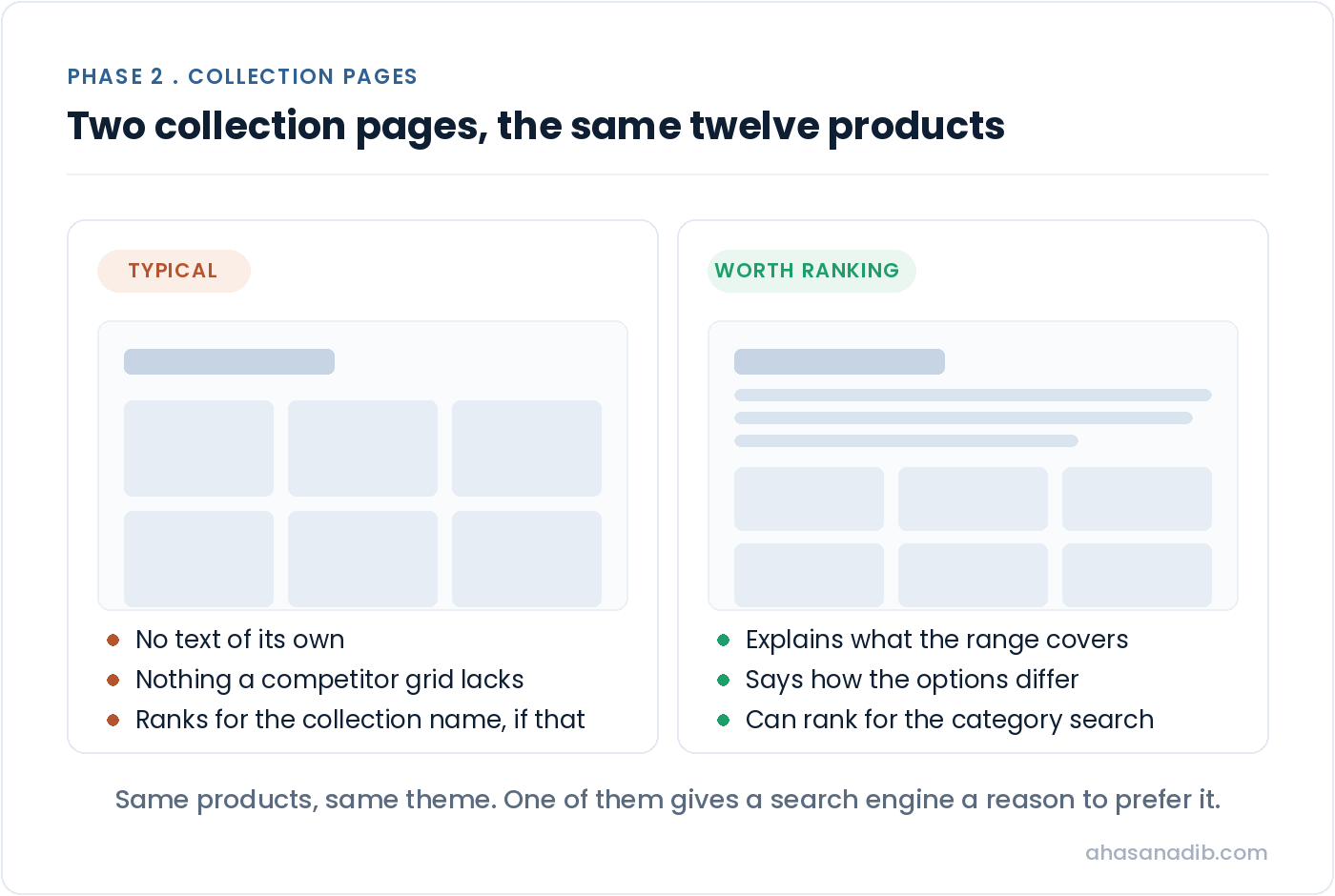
Collection pages are the biggest missed opportunity on almost every Shopify store I look at. They match how people actually search, which is in the plural and by category rather than by product name. Somebody looking for a specific product already knows what they want. Somebody searching a category is still choosing, which is the moment you want to be in front of them.
And most collection pages carry a heading, a grid of products, and nothing else. There is no reason for that page to outrank anything, because there is nothing on it that a competitor’s grid does not also have.
You do not need a thousand words. You need a few paragraphs that answer what somebody landing there is actually trying to work out: what the range covers, how the options differ, what to pick for which situation.
5. Write your collection titles and meta descriptions
Left alone, Shopify generates these from your collection name and stops. If your collection is called Summer 24 Drop, that is what search results will show, and it matches nothing anybody searched for.
Write them for your top collections at least. This is an afternoon of work on most stores and it changes what your listings say to the people deciding whether to click.
6. Name collection handles the way buyers search
Collection handles become the URL, and they are frequently set from whatever the collection was called internally. Supplier names, season codes and internal categories all end up in addresses where they help nobody outside your warehouse.
Changing a handle changes the URL, so redirect the old one. Shopify has URL redirects built into the admin, and skipping that step is how stores lose rankings during tidy-ups.
Phase 3: Product pages worth ranking
7. Replace the descriptions that came with the products
If your product copy arrived with the products, every other store selling that line has the same words. There is no version of that where a search engine has a reason to prefer yours.
Rewriting a whole catalogue is not realistic and not necessary. On most stores a small share of products earns the majority of the revenue. Start there, work down, and stop when the returns flatten.
8. Write titles the way people search, not the way suppliers name things
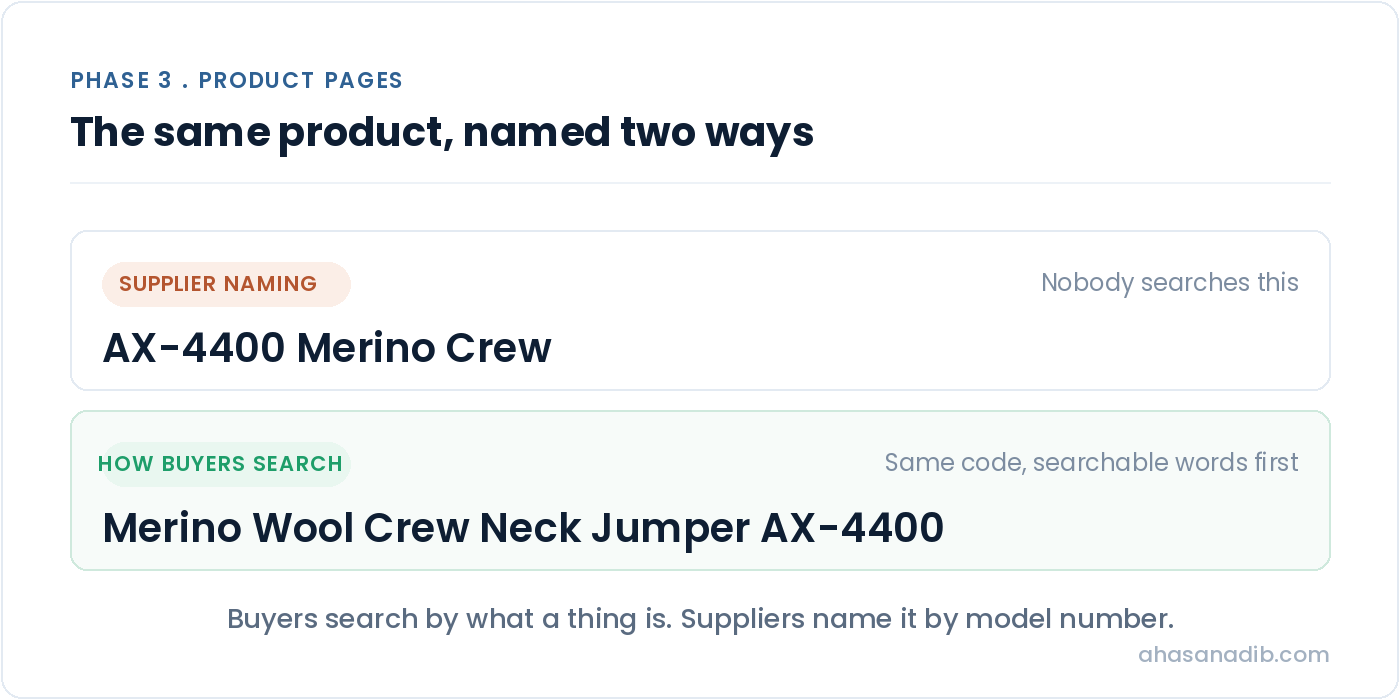
Buyers search by what a thing is and what it is for. Suppliers name products by model number and internal convention. Where those differ, the supplier usually wins by default because nobody changed it.
You can keep the model number. Put the searchable description first and the code after it.
9. Handle out-of-stock products deliberately
Products come and go, and what happens to their pages is usually decided by nobody. A product that goes out of stock permanently and is left to return an error takes whatever rankings and links it had earned with it.
Decide the rule: keep the page and say when it is back, redirect it to the closest alternative, or retire it properly. Any of those beats leaving it to chance.
Phase 4: Speed, apps and markup
10. Work out what your apps are costing you
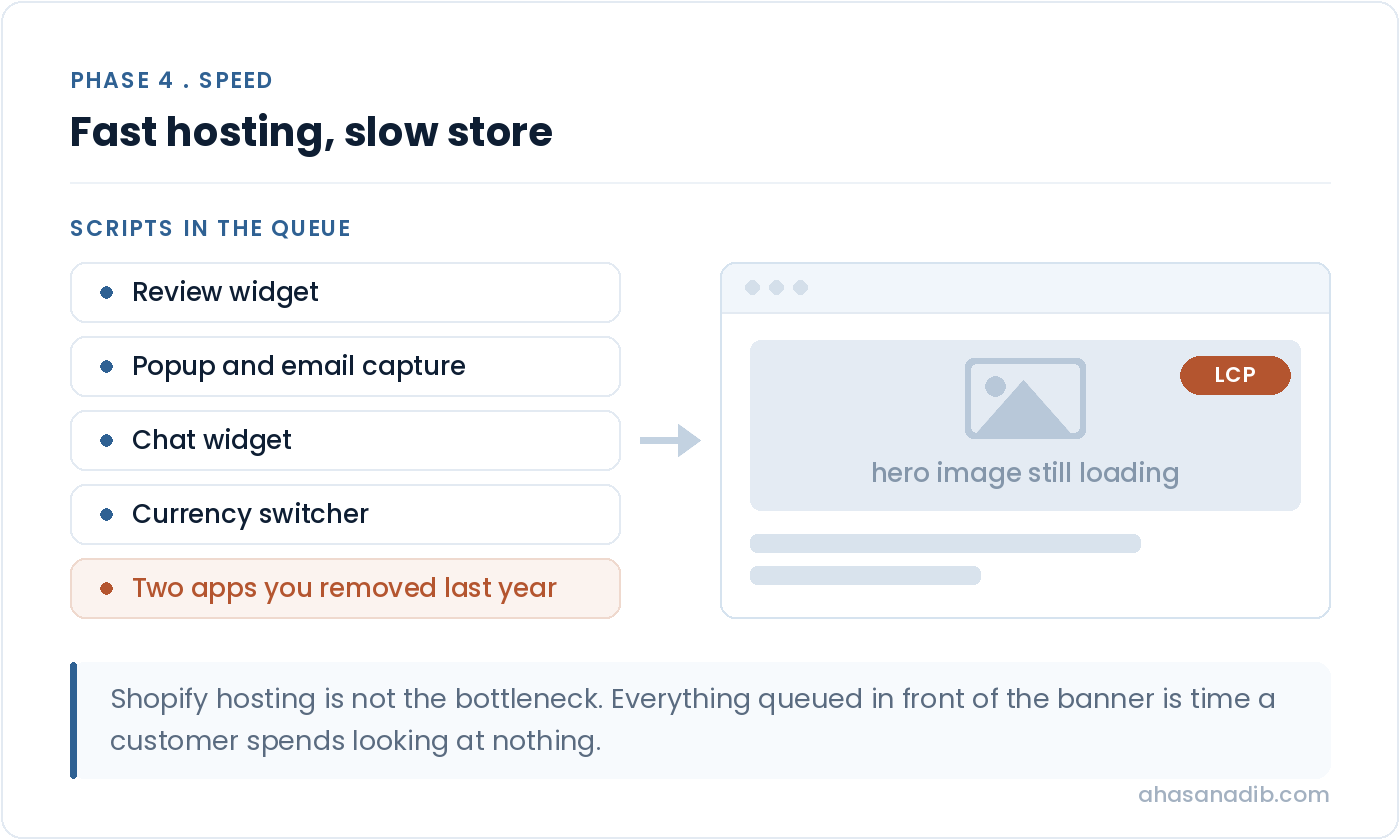
Shopify’s hosting is genuinely fast. Shopify stores frequently are not, and apps are usually the reason. Every app that injects a script runs while your page is trying to render, and a store carrying fifteen of them will fail its speed metrics regardless of how good the hosting underneath is.
Two things worth checking. First, whether you can name what each installed app does. If nobody can explain it, that is the answer. Second, whether uninstalled apps left code behind, because uninstalling frequently does not remove what an app added to your theme. Stores routinely load scripts for apps they stopped paying for years ago. I have written up the twenty-minute method for measuring what each app costs in how to speed up a Shopify website.
11. Fix the hero image before anything else on speed
On most stores the largest thing rendering is the banner image at the top of the homepage or a collection. Compressed properly, sized correctly and preloaded, it is often the difference between passing and failing Largest Contentful Paint on mobile.
Measure with field data rather than a lab score. Field data is real visitors on real phones. A green result on your laptop over office wifi tells you nothing about somebody loading your store on mobile data.
12. Make sure there is exactly one Product schema per page
Most Shopify themes output product markup already. Most review and SEO apps add their own. Two Product schemas on one page is worse than one, because neither can be trusted, and this is how it usually happens rather than through anything anyone did wrong.
Check that price, availability and currency are present, and that only one block is describing the product. That markup is also what answer engines read when they summarise what you sell, which makes it worth more than it used to be.
How long does Shopify SEO take to work?
The structural fixes in phase one can show within weeks, because you are unblocking pages that already exist rather than creating new ones. Search engines have to re-crawl before anything changes, so nothing is instant, but it is measured in weeks.
Ranking for competitive category terms is months, and it depends on how much authority your store already has. Anyone who tells you otherwise is selling something. I ranked a brand-new store against established competitors inside ninety days by doing the foundations first, and the numbers for that are on my results page.
Where AI search fits in
More product research now starts in an AI answer than on a results page, and the same work carries over. Clean structured data, a page that renders its content in HTML rather than only after JavaScript, and collection pages that actually explain something are what let an answer engine understand and cite your store.
There is no separate discipline here, which is the good news. The stores that are easy for search engines to read are the same stores that are easy for answer engines to read. If you want the detail, I have written separately on answer engine and generative engine optimisation.
Frequently asked questions
Is Shopify good for SEO?
Yes, with caveats worth understanding. Hosting is fast, HTTPS and mobile are handled, and the fundamentals work without configuration. What Shopify does not do is stop itself generating duplicate and thin pages, and it locks the URL structure so you cannot organise things the way you might elsewhere. Those are constraints to work within rather than reasons to leave. Shopify’s own SEO documentation is worth reading alongside this for the platform’s view of what it handles for you.
Do I need an SEO app for Shopify?
Usually not, and on several of these tips the app is the cause rather than the cure. Duplicate structured data and leftover scripts both come from apps far more often than from themes. Bulk-generated meta descriptions in particular tend to read worse than writing nothing. An app earns its place when it solves a problem you have already identified, not as a substitute for looking.
How many of these can I do myself?
More than you would think. Writing collection content, fixing titles and descriptions, rewriting product copy and auditing your app list need no technical skill, just time. The theme-level items, tip one in particular, are where a developer or a consultant saves you from changes that are hard to undo.
Which tip should I do first if I only do one?
Check whether your theme links products through collection paths. It is quiet, it is on a large share of stores, and it applies to your entire catalogue at once rather than one page at a time. Nothing else here has that reach for so little work.
Does any of this apply to Shopify Plus?
All of it, plus a few Plus adds of its own. Multiple storefronts and regional markets duplicate a catalogue in ways a standard plan cannot, so if you are running more than one storefront that relationship needs handling deliberately rather than discovering later.
How do I know which of these my store has?
Work through the Shopify SEO checklist. It is the same ground as this article turned into forty-five checks you can tick off, and it scores your store and names the area holding you back.
Where to start
If you take one thing from all the Shopify SEO tips above: fix the duplication before you write anything. Content on pages that are being treated as copies of other pages is the most common way store owners spend six months on SEO and see nothing move.
Work phase one, then measure. If indexed page counts settle and your products start appearing for their own names, the foundation is sound and phase two is worth the effort. If they do not, something structural is still wrong and more content will not fix it.
When you have been through it, the SEO audit report template turns your notes into something you can hand to a developer or keep as a record of what changed and when.
Want a second opinion on your store?
Bring it to a free call. We will look at it together and I will tell you honestly whether the problem is structural, competitive, or something that does not need me at all.
Book a free call →